


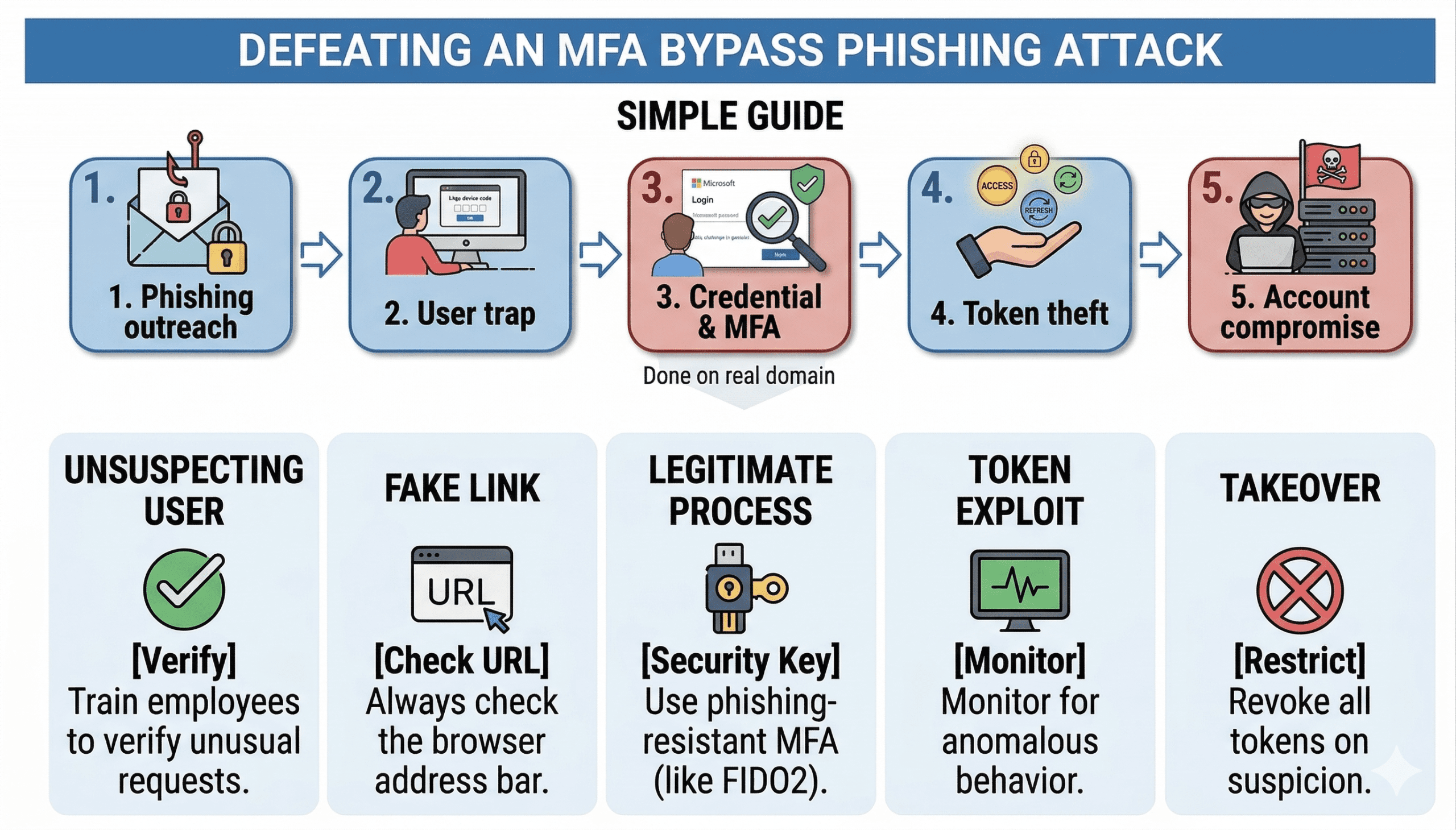
How Attackers Bypass MFA: Anatomy of a Modern Phish Using Token Theft
Multi-Factor Authentication (MFA) is one of the most widely recommended security controls out there. And for good reason. Requiring a second form of verification on top of a password closes the door on the vast majority of credential-based attacks.
But modern attackers have largely stopped trying to steal passwords. They go after something more valuable: your session tokens.
Through a technique called Adversary-in-the-Middle (AiTM) phishing, attackers can intercept authentication sessions in real time – capturing the tokens that prove you’ve already logged in – without ever needing your password or your MFA code. The attack is quiet, technically convincing, and effective against organizations that believe MFA alone is enough.
This post walks through exactly how the attack works, what makes it so effective, and what organizations can do to reduce their exposure.
Why MFA Alone Is No Longer Enough
MFA works by adding a layer on top of your password. Even if an attacker knows your credentials, they still need that second factor – a code from an app, a push notification, a security key. For a long time, that was a genuinely strong defense.
The problem is that MFA was designed around the idea that attackers would try to log in. Modern token theft attacks don’t bother with that step. Instead of stealing your password and guessing your code, attackers wait for you to log in and then steal the resulting session.
Think of it like this: a physical key gets you through a locked door. Once you’re inside, you don’t need the key anymore. Session tokens work the same way. They’re the proof, stored in your browser, that you’ve already been authenticated. Steal the token, and you’re inside – no key required.
The two tokens attackers are specifically after:
- Access Token – grants access to specific services (Outlook, SharePoint, Teams) for a limited time
- Primary Refresh Token (PRT) – longer-lived token used to request new access tokens, effectively keeping the attacker’s session alive
How a Token Theft Attack Works: A Real-World Example
During social engineering assessments, our team uses this exact technique to test how well an organization’s people and their controls hold up against advanced phishing. Here’s how it unfolds:
Step 1: The Setup – A Convincing Phishing Email
The target receives a phishing email that looks like a notification about a shared document – something familiar, like a OneDrive file or a SharePoint link. The email includes a link to a domain the attacker controls, designed to look plausible.
This is where most people expect to see a “bad” fake login page. That’s not what they see.

Step 2: The Hook – A Real Microsoft Login Flow
When the target visits the attacker’s page, they’re shown a code and prompted to verify their identity. The login page they’re directed to isn’t a fake, it’s the actual Microsoft device code authentication flow at login.microsoftonline.com.
This is what makes AiTM attacks so effective. The page looks legitimate because it is. The user logs in, completes their MFA prompt, and feels like nothing is wrong – because from their perspective, nothing is.

Step 3: The Capture – Tokens Intercepted in Real Time
While the user is going through that legitimate Microsoft flow, the attacker is sitting in the middle, passing the authentication along while intercepting the resulting tokens. The user completes MFA. The attacker captures the session.
No fake site. No stolen credentials. No failed MFA attempt to alert on. From a logging perspective, it looks like a normal, successful login.

| ⚠️ Key Point: MFA isn’t bypassed in these attacks – it’s completed by the victim and then reused by the attacker. That distinction matters a lot, because it means traditional indicators of a phishing attack often don’t appear. |
What Happens After the Tokens Are Captured
Once an attacker has a valid access token and primary refresh token, they have persistent, authenticated access to the victim’s Microsoft 365 environment – often without triggering any alerts.
In practice, that means access to:
- Outlook – read emails, intercept conversations, conduct internal spear phishing from a trusted account
- SharePoint & OneDrive – access or exfiltrate documents and sensitive files
- Microsoft Teams – monitor internal communications or impersonate the user
Because all of that activity is tied to a legitimate, authenticated session, security tools have a much harder time distinguishing it from normal user behavior. The attacker can maintain access until the token expires or is explicitly revoked which, in environments without strict token lifetime policies, can be a long time.
Why This Attack Is Particularly Hard to Catch
Most phishing defenses are built around a few core assumptions: there will be a fake login page, credentials will be entered somewhere suspicious, or MFA will fail. AiTM attacks sidestep all of that.
What the logs show:
- A successful login from the user’s account
- MFA completed successfully
- Access to resources the user is authorized to access
What the logs don’t easily show:
- That the session originated from an attacker’s infrastructure
- That the user never intended to grant access
The attack works because it exploits user trust in a legitimate system. The user isn’t doing anything wrong, they’re just doing exactly what the attacker is counting on them to do.
How to Defend Against MFA Bypass Attacks
The good news: there are concrete, actionable steps that significantly raise the bar for this type of attack. None of them require ripping out your existing MFA setup.
1. Restrict Device Code Authentication
Device code flow exists to support authentication on devices that don’t have a browser, like smart TVs or IoT devices. Most organizations don’t need it for their workforce. If you’re not actively using it, disable it via Conditional Access Policy. This removes the primary mechanism these attacks rely on.
2. Use Phishing-Resistant MFA Where Possible
Not all MFA is created equal. Hardware security keys (FIDO2) and Windows Hello for Business are resistant to AiTM attacks because the authentication is bound to the specific site – a token captured from one session can’t be replayed from a different origin. For high-value accounts, this is worth prioritizing.
3. Strengthen Conditional Access Policies
Conditional Access is one of the most powerful tools available in Microsoft 365 environments. Key configurations that help here:
- Require device compliance (managed, Intune-enrolled devices)
- Block access from unknown or high-risk locations
- Enable sign-in risk policies that flag unusual session behavior
4. Reduce Token Lifetimes and Monitor for Anomalies
Shorter-lived tokens limit how long an attacker can use a captured session. Pair this with monitoring for:
- Impossible travel (same account, two geographically distant locations in a short time)
- New device sign-ins for established accounts
- Unusual volume of file access or email reads
5. Train Employees to Recognize the Red Flags
Technical controls help, but they aren’t foolproof. Users who know what to look for are a meaningful additional layer. Training should cover:
- Why they should be suspicious of any unsolicited prompt asking them to “verify” something
- How to check the actual domain of any site they’re being sent to
- What the device code flow is and why entering a code from an email is inherently risky
Related: Tips to Improve Employee Security Awareness
What We’ve Seen in Real Engagements
Across multiple social engineering assessments, we’ve found that users who would never enter credentials into a fake login page will still fall for device code phishing, because everything they see is legitimate. The Microsoft login prompt is real. The MFA push is real. There’s nothing obviously suspicious to trigger their instincts.
What’s telling is how often existing security controls miss it. Anti-phishing tools don’t flag the attacker’s domain (it’s not hosting credentials). Email security tools don’t catch the email (it’s well-crafted). Identity protection alerts don’t fire (the authentication succeeded). The attack flew under the radar – and that’s exactly the kind of gap a targeted assessment is designed to surface.
Related: Everything You Need to Know About an External Penetration Test
Final Thoughts
MFA is still one of the best things an organization can do to protect its accounts. But it’s not a finish line, it’s a baseline. Attackers have adapted, and defenses need to adapt with them.
Token theft attacks are effective precisely because they don’t fight MFA. They route around it. Understanding that distinction is the first step toward building defenses that actually hold up against modern threats.
If you’re not sure whether your Microsoft 365 environment is protected against these techniques, or you want to see how your employees respond to a realistic simulation, we can help. Our social engineering assessments are built around the same attack chains real threat actors use.
Schedule a free introduction call to get started.
Frequently Asked Questions
Token theft is when an attacker captures the authentication tokens your browser stores after a successful login. These tokens prove you’re already authenticated, so anyone who has them can access your accounts without entering a username, password, or MFA code.
Yes. Adversary-in-the-Middle phishing attacks specifically target the post-authentication session rather than the authentication itself. The victim completes MFA normally; the attacker intercepts the resulting token. This makes MFA “succeed” from a logging perspective while still giving the attacker access.
An AiTM attack positions the attacker between the victim and a legitimate service. In phishing scenarios, this typically means proxying the victim’s authentication through attacker-controlled infrastructure, allowing the attacker to capture session tokens in real time while the victim completes a real login flow.
Device code authentication is a legitimate Microsoft flow designed for devices without a browser. It asks users to visit a URL, enter a code, and log in to grant access. Attackers abuse this flow in phishing because the login page and MFA prompt the victim sees are completely real – there’s no fake site to detect.
The most impactful steps are: restricting or disabling device code authentication via Conditional Access, requiring device compliance, implementing phishing-resistant MFA (FIDO2/hardware keys) for privileged accounts, shortening token lifetimes, and monitoring for anomalous sign-in behavior like impossible travel or unusual access patterns.
A social engineering assessment simulates real-world phishing and manipulation attacks against your employees and technical controls to identify gaps before a real attacker does. This can include phishing email campaigns, phone-based pretexting, and advanced techniques like the device code phishing described in this post. The goal is to show you exactly how an attacker could get in and what to fix.


